Freedom Solutions
Project Status Report Power BI Dashboard - PBIX + Excel
Project Status Report Power BI Dashboard - PBIX + Excel
Couldn't load pickup availability
This Power BI Project Status Report is a complete and ready to use file designed for project managers and PMO teams who need clear and consistent project updates. It provides a structured layout for reporting progress, financials, accomplishments, planned actions, risks, issues and timelines, all presented in a professional and easy to read format.
The report includes a full set of fields and visuals that support real project reporting. You can connect your own data, adjust the content to match your governance approach and use the report as part of your regular project or steering committee updates. It is suitable for individual projects or for use within a wider portfolio reporting process.
An Excel file with sample project data is included so you can explore the report straight away and see how the visuals behave before connecting your own information. Once your data is linked, the report is ready for use in Power BI Desktop or Power BI Service.
This report is intended for teams who want a complete and reliable project status view without building one from the beginning. It offers a practical starting point that can be adapted to your organisation’s terminology and reporting style.
For the Claude & AI Developers
🤖 Claude-Ready Native Blueprint
- No hidden code, zero dodgy third-party plugins, and no weird custom scripts.
- We build our models using 100% native DAX and/or clean Power Query M-code, so they're completely transparent.
- If you’re using Claude Code, Claude Desktop, or an MCP server, just save this file as a Power BI Project (.pbip). It exposes the clean semantic model straight to your AI agent so you can spin up new measures or scale the framework without any hallucinations or formatting errors.
Overview
Overview
This report provides a complete and structured view of project status information in Power BI. It brings together progress, financials, risks, issues, accomplishments and planned actions in a single, easy to read layout. The design supports regular project updates and can be used for weekly reporting, steering committee packs or portfolio level reviews.
What's included
What's included
The report contains the following sections:
- Project details including phase, manager, sponsor and business area
- Progress and completion percentage
- Baseline and actual dates
- Budget, forecast, actuals and variance
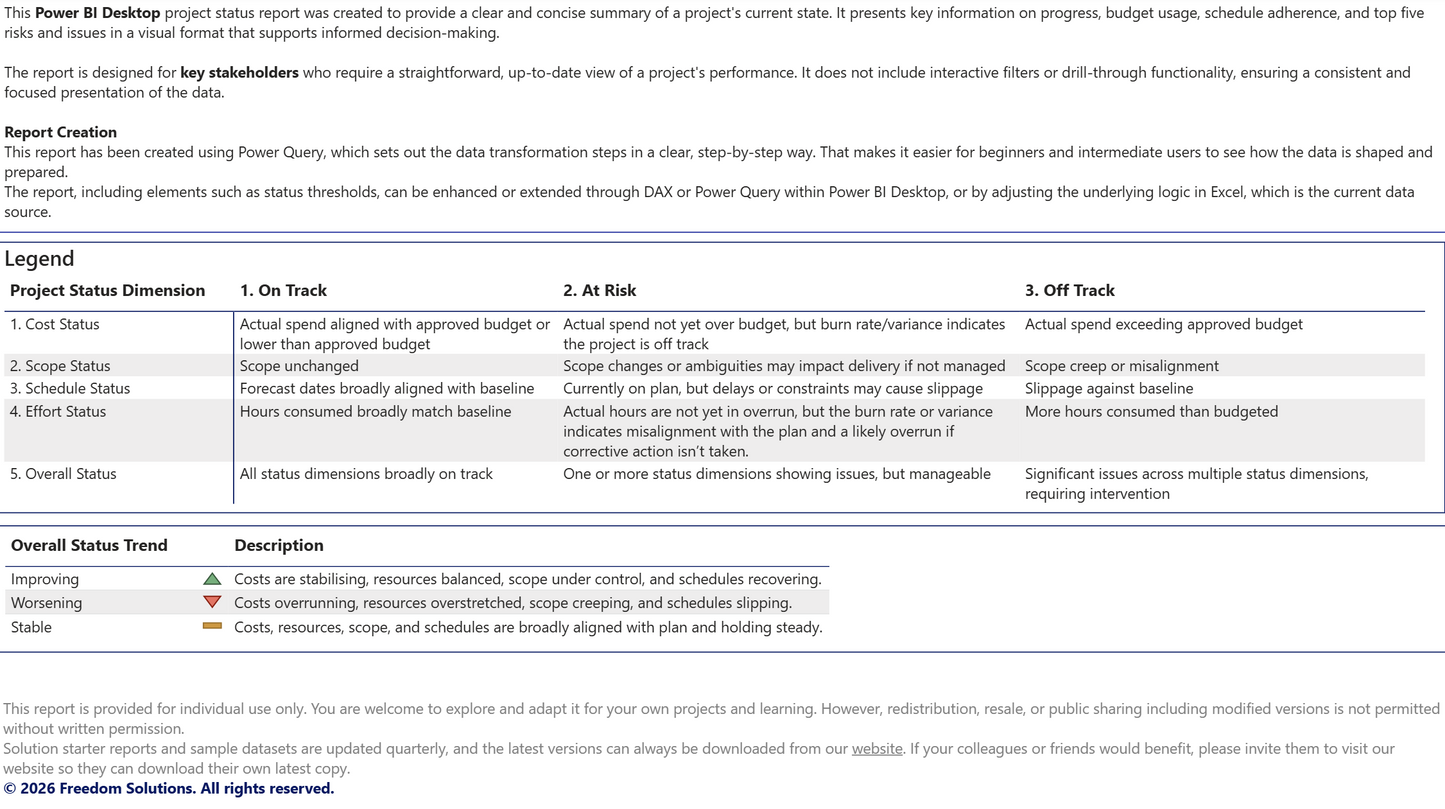
- Overall status and trend
- Description of the project
- Accomplishments from the previous reporting period
- Planned actions for the next reporting period
- A list of open risks and issues
- A timeline view showing project phases
An Excel file with sample project data is included so you can explore the report before connecting your own information.
Free lifetime updates - if the file is improved or updated in the future, you’ll receive the new version at no extra cost.
How to use it
How to use it
Power BI Desktop is required to open and use this report. No Premium or Fabric licences are needed unless you choose to publish it to the Power BI Service.
Quick Start Instructions
- Download: Save and extract the .zip package containing the .pbix file and the Excel data source.
- Repoint Data: Open the report in Power BI Desktop. Select 'Transform Data' > 'Data Source Settings' and point the source to the included Excel file.
- Filter & Refresh: Use the Filters Pane to select your project Id. The visuals will update instantly with the sample data.
When ready, replace the sample Excel file with your own project data or connect to your preferred data source. You can adjust labels, colours and layout to match your organisation’s reporting style.
Want a completely hands-off setup?
If you or your delivery teams don't have the time to configure data models, you can pair this template with our Custom Column Mapping Service. Simply email us your plain text column headers. Our team handles the underlying Power Query automation behind the scenes and delivers a pre-linked, custom-mapped .pbix file straight to your inbox within two business days. No company data required.
Benefits
Benefits
This report helps project teams present information in a clear and consistent way. It reduces the time spent preparing updates and supports better communication with stakeholders. The structured layout makes it easier to track progress, highlight risks and show financial performance. It also provides a professional format that can be used across multiple projects.
Instead of paying a contract data engineer which may cost over £1,000 to build a custom Power BI model from scratch or waiting in the queue for internal BI support, you can download this compiled PBIX file and have a fully structured report ready to use immediately.
Important notes
Important notes
This report has been created by Freedom Solutions and is not affiliated with or endorsed by Microsoft. Microsoft and all Microsoft product names including Power BI, Excel, Power Apps, Power Automate, SharePoint, Teams and Office are trademarks of Microsoft Corporation.
This report is provided for individual use only. You are welcome to explore and adapt it for your own projects and learning. Redistribution, resale or public sharing including modified versions is not permitted without written permission.
This report is provided as a PBIX file and does not include customisation or support for specific data models. You may need to adjust field names or data types to match your own project information. The sample Excel file is for demonstration only and should be replaced with your own data before using the report for formal updates.
This report is provided for informational and reporting purposes only. Freedom Solutions is not responsible for any decisions, actions, financial loss or operational impact resulting from how this report or its outputs are used.
By downloading the files, you accept Freedom Solutions Terms of Service.
© 2026 Freedom Solutions. All rights reserved.
Share