Freedom Solutions
FREE Power BI Project Status Dashboard (PBIX)
FREE Power BI Project Status Dashboard (PBIX)
Couldn't load pickup availability
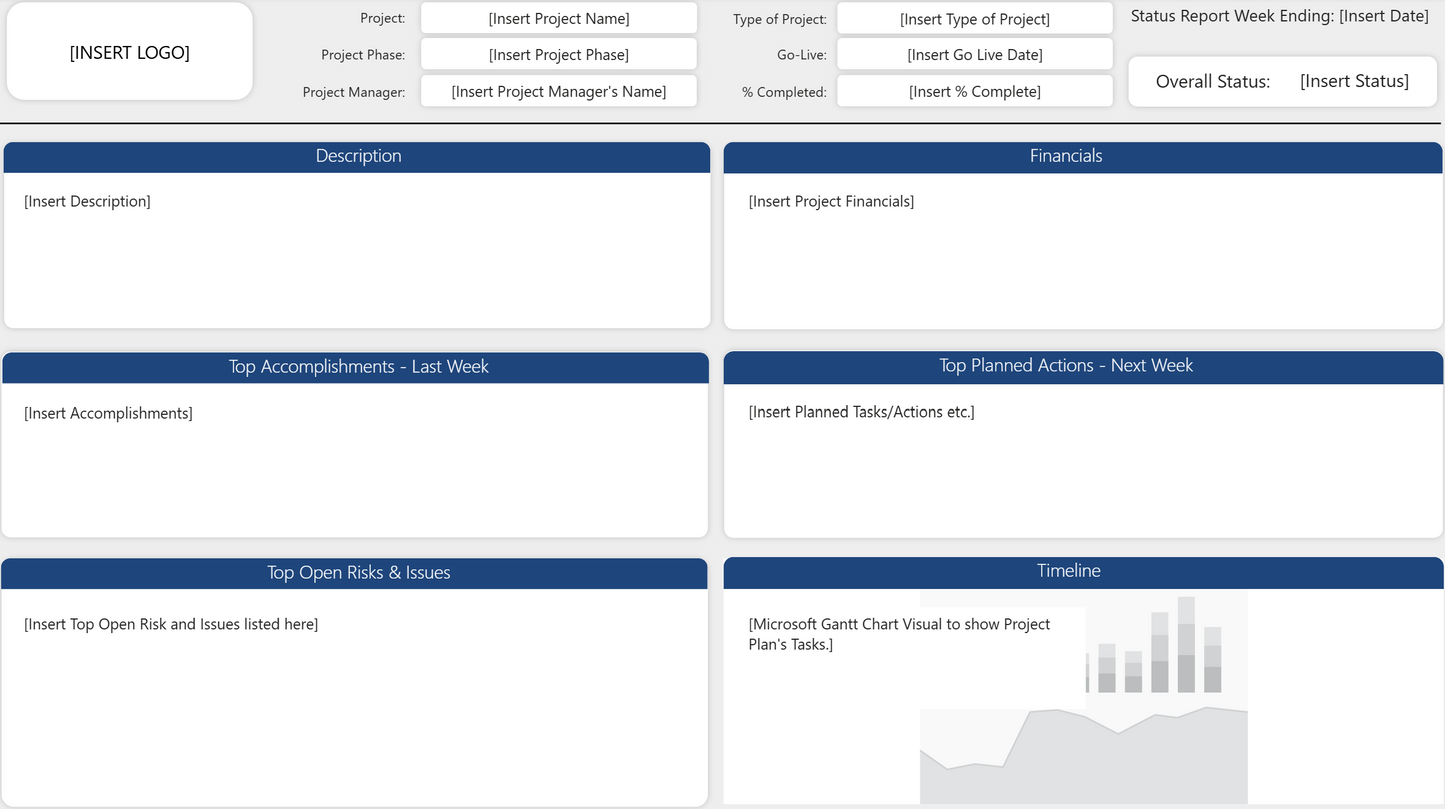
This Power BI Project Status Sample Report provides a simple example of how project information can be presented in Power BI. It shows a basic layout for reporting progress, financials, accomplishments, planned actions, risks, issues and timelines, giving you a clear starting point for understanding the structure of a project status report.
The sample report is intended for demonstration and exploration. You can open the file in Power BI Desktop, review the layout and see how the fields are arranged. It is a helpful way to understand the reporting approach before moving on to a more complete project status report.
This sample does not include data and is not designed for production use. It is suitable for project managers, PMO teams and anyone who wants to see a simple example of a project status report in Power BI.
For the Claude & AI Developers
🤖 Claude-Ready Native Blueprint
- No hidden code, zero dodgy third-party plugins, and no weird custom scripts.
- We build our models using 100% native DAX and/or clean Power Query M-code, so they're completely transparent.
- If you’re using Claude Code, Claude Desktop, or an MCP server, just save this file as a Power BI Project (.pbip). It exposes the clean semantic model straight to your AI agent so you can spin up new measures or scale the framework without any hallucinations or formatting errors.
Overview
Overview
This sample report provides a simple example of how project information can be displayed in Power BI. It shows a basic layout for progress, financials, accomplishments, planned actions, risks, issues and timelines.
What's included
What's included
The download contains a single PBIX file with a basic project status layout. It includes placeholder fields for project details, financials, weekly updates and a timeline. No sample data is included.
If the file is improved or updated in the future, you’ll receive the new version.
How to use it
How to use it
Power BI Desktop is required to open and use this report. No Premium or Fabric licences are needed unless you choose to publish it to the Power BI Service.
Download the PBIX file and open it in Power BI Desktop. Review the layout and explore how the fields are arranged. This sample is intended for demonstration only and should be replaced with your own project information if you choose to build on it.
Quick Start Instructions
- Download: Save and extract the .zip package containing the .pbix file and the Data Prep Guide.
- Open the report in Power BI Desktop and add your preferred project data source.
- Filter & Refresh: Use the Filters Pane to select your project . The visuals will update instantly.
If you’d like to explore with our sample data, you can download it from here. Using the sample data helps you get familiar with the report straight away, without needing to prepare your own dataset first.
Benefits
Benefits
This sample helps you understand the structure of a project status dashboard report in Power BI. It provides a simple starting point for teams who want to explore reporting options before moving to a more complete solution.
Important notes
Important notes
This report has been created by Freedom Solutions and is not affiliated with or endorsed by Microsoft. Microsoft and all Microsoft product names including Power BI, Excel, Power Apps, Power Automate, SharePoint, Teams and Office are trademarks of Microsoft Corporation.
This report is provided for individual use only. You are welcome to explore and adapt it for your own projects and learning. Redistribution, resale or public sharing including modified versions is not permitted without written permission.
This report is provided as a PBIX file and does not include customisation or support for specific data models. You may need to adjust field names or data types to match your own project information. No sample data is included and you are responsible for adding your own information if you choose to use this report for further development.
This report is provided for informational and reporting purposes only. Freedom Solutions is not responsible for any decisions, actions, financial loss or operational impact resulting from how this report or its outputs are used.
By downloading the files, you accept Freedom Solutions Terms of Service.
© 2026 Freedom Solutions. All rights reserved.
Share